"An unknown error has occured" during installation
-
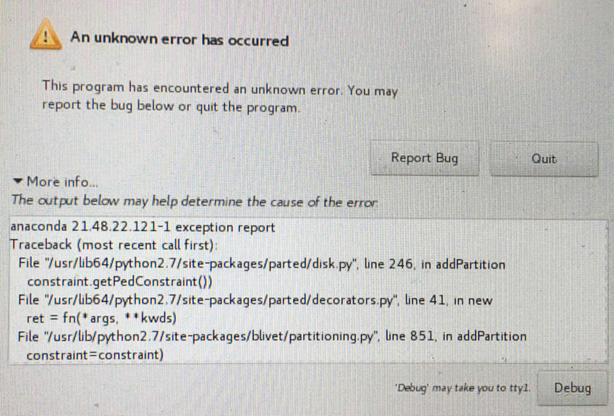
Problem description: “An unknown error has occurred” when installing
Problem analysis:
Reason 1:There is other residual dirty data on the hard disk, you need to use dd to format the disk;
Reason 2: USB drive burning problem, ISO is incomplete or incomplete after burning, improper USB drive plugging and unplugging may also cause USB drive data damageProblem handling process:
- The hard disk to be installed has dirty data, use dd to format it and execute
dd if=/dev/zero of=/dev/sdX bs=10M count=100Where: sdX is the disk symbol of the system to be installed, use fdisk to view
To format the disk, write 100 consecutive blocks of 10MB binary zeros to the target disk, resulting in approximately 1GB of zero data being written in total.- Clear the metadata on the hard disk, Ctrl + alt +F5 to enter the command line
dmraid -r -E /dev/sd<x>- Verify whether the ISO md5 is correct
- Whether the USB drive burning is complete, whether the USB itself has problems
- Whether there is a problem with the server USB interface
- IPMI network fluctuations cause CD-ROM not to be mounted
-
 undefined nexus marked this topic as a regular topic on